Salesforce knows what was sold. Xero knows what was billed.
In many businesses the two never meet, so the CRM's picture of each customer stops at the deal. Connecting them puts what each customer was invoiced and has paid alongside everything else you know about them.
Watch the walkthrough
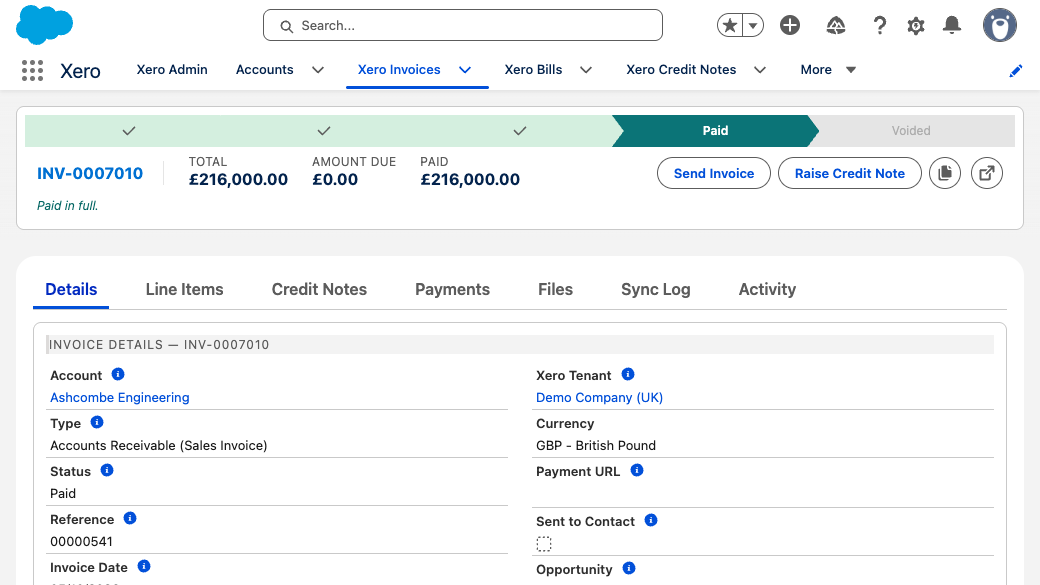
Adam walks through the whole billing cycle in a demo org: an invoice raised from the deal and posted to Xero, the payment coming back, credit notes, purchase orders and supplier bills, then a finance dashboard you can ask questions of.
What changes when they are connected
Order to paymentOrder to payment
Invoices raised from the Salesforce record, with payments, credit notes and status coming back, so there is a trail from what was ordered to what was paid.
Spend against forecastSpend against forecast
See what each customer has actually spent and how it is trending, and compare it with what was forecast while there is still time to act.
Commission on what was billedCommission on what was billed
Reconcile what salespeople sold against what was invoiced without doing it by hand.
Credit control from SalesforceCredit control from Salesforce
Overdue invoices sit alongside the account, its contacts and its history, so whoever chases has the full picture.
Invoices in your brandInvoices in your brand
Custom invoice documents that match your brand and carry the detail your customers need.
Nothing quietly missingNothing quietly missing
Every sync is logged, so anything that fails to go across is visible. Purchase orders and bills can follow the same route.
Why an accelerator
Packaged connectors handle the common cases well, but almost every business has something it needs that a package was not built for. Filling that gap with a bespoke build used to carry a final cost that was hard to predict.
Rather than starting from scratch for each client, we have built an accelerator. The records, the sync and the error handling already exist, and the work is in fitting them to how your business actually bills. We have installed it successfully with a number of clients, and we can tell you what it will cost before any work starts.
The full story is in our article, Your CRM says what will happen. Xero says what did.
What installing it involves
Where an invoice should come from, how your accounts receivable process works, how your account codes and tax are set up, and who needs to see what.
Where an invoice should come from, how your accounts receivable process works, how your account codes and tax are set up, and who needs to see what.
We build it in a Salesforce sandbox connected to a Xero demo company and hand it over for testing, so your team can work through real scenarios without touching your live accounts.
When you are satisfied, we move it into your live Salesforce and Xero.
Quoting as well as billing? See Deal Builder.
Can Salesforce tell you what each customer was billed?
We will look at how you invoice today and show you what connecting Salesforce and Xero would change.